Herd management
Managing alpacas: when Excel is enough and when software pays off
Timm Quandt7 min read
Many keepers manage their alpacas in Excel, and for a small herd that often works well. It gets tight once breeding comes in, several people work with the file or the Veterinäramt (veterinary office) asks for the herd register. This article covers when Excel is enough, where a spreadsheet reaches its limits and what to look for if you are thinking about alpaca software.
How an Excel spreadsheet turned into ALPAKA.PRO
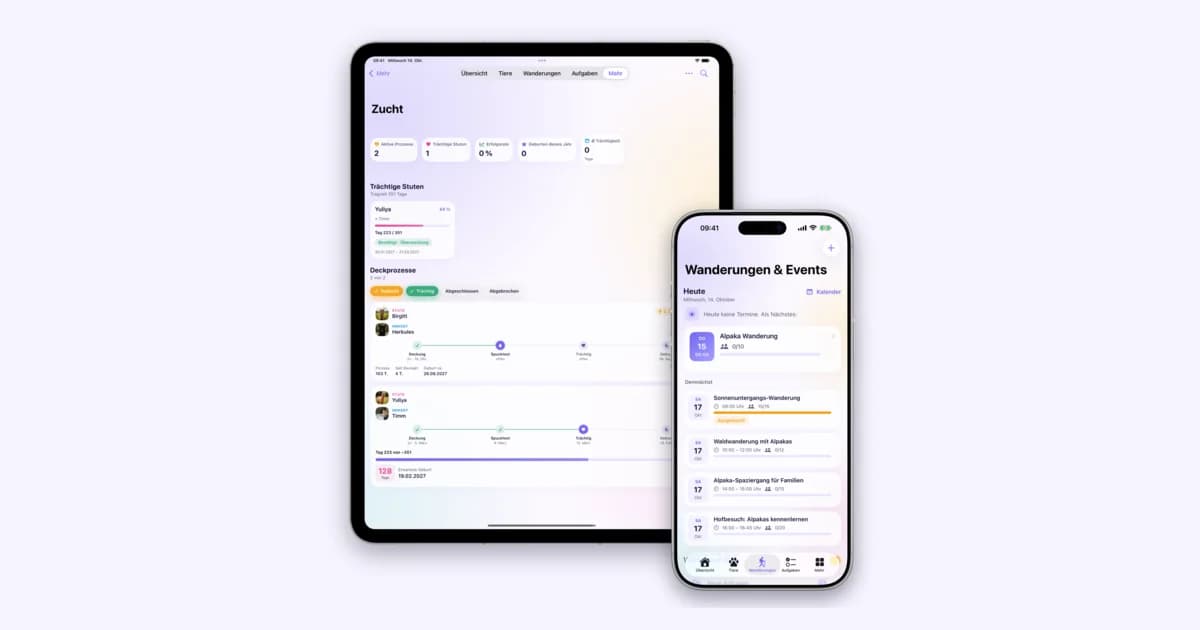
I’m Timm, a software developer and the founder of ALPAKA.PRO. While I was at university, the parents of a fellow student moved from Berlin to Rubkow in Western Pomerania and started Alpaka Idylle there. I looked after their website at the time. One day Sven told me he was planning his breeding in Excel and that, across several generations, it had become almost impossible to keep track.
ALPAKA.PRO grew out of that conversation. So the question this article is about was my first question too: does this really need its own software, or is a well-built spreadsheet enough? That depends on your herd. For some keepers the honest answer is: Excel is enough.
When Excel is perfectly fine
If you keep a few geldings or females, don’t breed and don’t offer walks, you don’t need specialized software. A spreadsheet with name, date of birth, microchip number, origin and the latest treatments covers the essentials. You put shearing in the calendar once a year, and since you see every animal daily, you keep the rest in your head anyway.
Excel has real advantages here. It is already installed on many computers, you don’t have to learn anything new, and you set up the columns the way that suits your farm. There is no extra subscription. If you work this way and are happy with it, you are doing nothing wrong.
One obligation applies to small herds as well, though: the herd register. More on that shortly.
Where Excel reaches its limits
It rarely happens all at once. Usually the file grows with the herd, gets new sheets and columns, and at some point maintaining it takes more time than the overview it gives you. These are the places where most keepers notice it first.
Pedigree and inbreeding across several generations
Entering sire and dam in two columns is easy. One level further it gets tedious: for the grandparents you jump to the parents’ rows, for the great-grandparents once more. When animals from other farms join, whose ancestors aren’t in your herd, you need extra rows or a separate sheet. That is exactly where Sven was back then.
This weighs most heavily when planning matings. Common ancestors often only show up a few generations back, and you can’t tell from the names whether a female and a male are related. In theory you can calculate an inbreeding coefficient in a spreadsheet too. In practice hardly anyone does, because the formulas quickly become confusing across several generations. Breeding software calculates it for every planned mating before you decide. What the value means and how to quickly check a single mating yourself is shown in the guide Alpaca inbreeding coefficient, with calculator. How software helps with mating plans and health data in breeding is covered in the article Alpaca breeding software: pedigree and mating plans.
The herd register
In Germany, every keeper of alpacas and llamas has to keep a herd register (Bestandsregister) under § 45 of the Viehverkehrsverordnung (livestock movement ordinance), even with two animals. It must contain the number of animals at the start of the year and every arrival and departure with the date and the name and address of the previous owner or the buyer. In Excel that is another list you maintain next to the animal list. When a cria is born or you sell an animal, you enter it twice, and if the two lists don’t match, it shows up at the latest during an inspection. Software can create the register from the data that is already in the animal record. Exactly which information is required is explained in the article on the alpaca herd register.
Appointments: vaccination, deworming, birth
A spreadsheet doesn’t remind you of anything. Whether the next vaccination is due, a fecal sample is coming up or a female should give birth soon, you only notice when you open the file and do the math. That is why many keepers also keep a calendar, and then the same data lives in two places. With the due date there is the added issue that gestation in alpacas can vary by several weeks. How to calculate it from the mating date is shown in the guide on mating and gestation with calculator.
Several people and a barn without signal
As long as one person maintains the file, that works fine. Once partners, children or staff join in, copies appear quickly: one on the laptop, one as an email attachment, one on the phone. A shared file in the cloud solves part of this, but it needs a connection, and in the barn or out in the pasture that is often poor. The weight then ends up on a slip of paper and in the spreadsheet in the evening, if you remember.
Versions and data loss
An Excel file is only as safe as the place where it is stored. If the computer breaks and there is no recent backup, years of breeding data are gone. On top of that come silent errors, such as a cell overwritten by accident or a sorted column whose neighboring column didn’t move with it. Things like that often only come to light months later.
Bookings for walks
If you offer alpaca walks, you manage guests, dates, payments and vouchers alongside the animals. With a spreadsheet that means taking requests by phone or message, counting free spots by hand and checking incoming payments. With a few dates a month that works. In the season it quickly turns into a second job. What a booking system for walks should do is covered in the article Online Booking for Alpaca Walks.
Excel and alpaca software compared
The table puts both approaches side by side. The right-hand column shows what specialized software can do, with ALPAKA.PRO as the example.
| Criterion | Excel | Alpaca software (example ALPAKA.PRO) |
|---|---|---|
| Cost | Usually already there, no extra subscription | Monthly fee, with ALPAKA.PRO from €5 a month plus VAT, 30 days free |
| Getting started | Hardly needed, you know the program | New interface, existing data has to move |
| Flexibility | Every column freely chosen | Fixed structure, but the same for every animal |
| Taking your data with you | The file is yours, any format is possible | Check beforehand which exports exist; ALPAKA.PRO exports the herd register and pedigrees |
| Pedigree | Parents in columns, further generations by looking them up | Across any number of generations, export as PDF or image |
| Inbreeding coefficient | Only with complex formulas of your own | Calculated for every planned mating |
| Reminders | None, appointments go in a separate calendar | Vaccinations, treatments and tasks with reminders |
| Herd register | Separate list, arrivals and departures entered twice | Created from the animal data, exportable at any time |
| Several people | Shared file or copies by email | With ALPAKA.PRO, up to 10 members with read-only access on the Team plan |
| In the barn | Possible on the phone, but large spreadsheets are tedious there | iOS app for iPhone and iPad, also offline; in the browser on any device |
| Backups | Your job, you make backup copies yourself | Data is stored by the provider, with ALPAKA.PRO on servers in Germany |
| Walks | Bookings and payments by hand | Your own booking page, online payment and vouchers |
Excel comes out ahead on cost, getting started and flexibility, and when it comes to who owns the data, a file of your own is hard to beat. Software pays off when the rows further down matter to you: breeding across generations, obligations like the herd register, several people on the farm or bookings from guests.
What to look for in alpaca software
When you compare providers, ask them these questions before you look at individual features.
- Where is the data stored? Servers in Germany or the EU make the GDPR question simpler. Ask to be shown who has access and how the data is protected.
- How do I get my data back out? Ask which exports are available. If your data is stuck in a program, switching later becomes expensive.
- Will the provider transfer my existing data? Retyping years of spreadsheets by hand keeps many people from switching. Find out beforehand whether an import is possible and what it costs.
- What does it cost per month, and what is included? Don’t just compare the base price. Does the app cost extra, is there a limit on the number of animals, can other people work with you?
- How long am I tied in? A plan you can cancel monthly and a trial without payment details keep the risk small. You can still choose a yearly plan once you are sure.
- Does the app work in the barn? If you want to record data right by the animals, check whether the app runs without a connection and syncs later, and which devices it is available for.
- Does the software know camelids? Make sure you can add alpacas, llamas and huarizos and that data such as fiber and shearing has a place.
For context, here is how ALPAKA.PRO stands on these points: the servers are in Germany, and the plans start at €5 a month and can be cancelled monthly. The iOS app is included in every plan and works offline; on Android you use the web app in the browser. All plans in detail are on the Pricing page.
Switching without retyping
Most of the work in switching is in the old spreadsheet. At ALPAKA.PRO we take over that part. You sign up, send us your file by email from the address of your account, and we import animals, pedigrees and health data as far as they are in the file. That can be an Excel file, a CSV or an export from your current program, no matter how the spreadsheet is laid out. It is usually done within one day and costs nothing, not even during the trial. How it works is described on the home page under Data import.
That way you test with your real animals instead of sample data and decide after the 30 days whether the software is worth the switch to you. If not, you still have your Excel file.
Conclusion
For a small herd without breeding, Excel is a good tool. If you breed across several generations, need to keep track of appointments for many animals, work with other people or sell walks, it is worth looking at specialized software. Back then, Sven had reached that point with his breeding. Whether your herd is there yet, you can judge best yourself.
Frequently asked questions
Is Excel enough to manage alpacas?
For a few animals without breeding and without walks, usually yes. A spreadsheet with basic data and treatments covers the essentials. It gets difficult with pedigrees across several generations, with inbreeding calculations, with reminders for appointments and when several people work with the same file.
May I keep the herd register in Excel?
Yes. The Viehverkehrsverordnung (livestock movement ordinance) does not prescribe paper. The register has to contain all the required information and be available for inspection on request. In Excel that usually means a separate list next to the animal list, where you enter every arrival and departure.
What does alpaca software cost?
That depends on the provider. ALPAKA.PRO costs €5 a month for up to 10 animals, €15 with no animal limit and €25 with access for your team, each plus VAT and cancellable monthly. The first 30 days are free, and you don’t need payment details for them.
Can I move my Excel spreadsheet into software?
With ALPAKA.PRO, yes, without retyping. You send the file by email, and we import animals, pedigrees and health data as far as they are in the file. It is free of charge, even during the trial, and usually done within one day.